
Script
A script defines functions and the application calls them. It never calls them itself and
never talks to Discord. read and activity are required; meta is optional. Every
interval seconds the application calls read, then activity and meta with what read
returned. When read returns null, the round ends there.
A script is one file of plain JavaScript. It cannot import other files, and it has no
fetch, URL or DOM. What it can use besides the language is in Helpers and
Host. Variables outside the functions keep their values between calls.
read(context)#
Looks at the world and returns what the presence needs, or null when there is nothing to show.
function read(context) {
  const page = bestPage(context.pages);
  if (!page) return null;
  return { title: page.title, opened: context.now };
}
Field of context |
Type | What it holds |
|---|---|---|
now |
number | The time, in Unix seconds. |
pages |
list of pages | Pages of the browser that match this presence. Empty for a desktop presence. |
options |
object | The value of each option, or its default. |
| Field of a page | Type | What it holds |
|---|---|---|
url |
text | Full address of the page. |
title |
text | Title of the tab. |
received_at |
number | When it was read, in Unix milliseconds. |
values |
object | What the manifest asks to read, under each name. See Extractors. |
Returns a plain object of up to 64 KB, or null. Only data passes: functions are dropped.
activity(seen)#
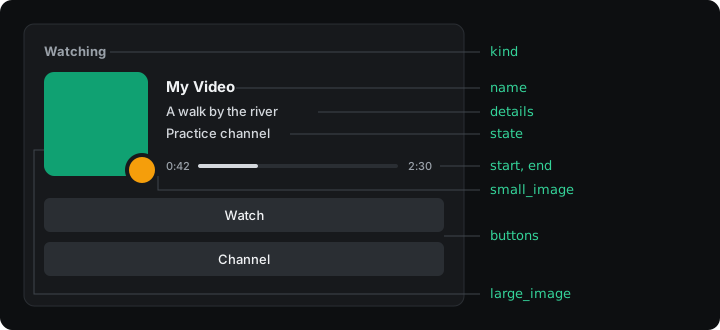
Turns what read returned into the card. Every field is optional, but the card needs at
least a text or an image.
function activity(video) {
  return {
    name: "My Video",
    details: cut(video.title),
    state: video.channel,
    kind: "watching",
    start: video.start,
    end: video.end,
    buttons: [{ label: t("watch"), url: video.url }],
  };
}
| Field | Type | What it does |
|---|---|---|
name |
text | Title of the activity, in place of the Discord application’s name. |
details |
text | First line. |
state |
text | Second line. |
kind |
playing, listening, watching or competing |
The word before the name. playing when missing. |
start |
number | Unix seconds. Alone, the time counts up from it. |
end |
number | Unix seconds. With start, it draws a progress bar. |
large_image |
text | An https:// address, or the name of an image of your Discord application. |
large_text |
text | Shown when hovering the large image. |
small_image |
text | Small picture in the corner of the large one. Same values as large_image. |
small_text |
text | Shown when hovering the small image. |
buttons |
list | Up to two { label, url }. |
details_url |
text | Address opened when clicking the first line. |
state_url |
text | Address opened when clicking the second line. |
large_url |
text | Address opened when clicking the large image. |
small_url |
text | Address opened when clicking the small image. |
party_size |
[current, largest] |
Shown as “(2 of 4)”. |
status_display |
name, state or details |
Which text the member list shows next to the person’s name. |
Texts take 2 to 128 characters; a shorter one is dropped, a longer one is an error, and
cut keeps them inside the limit. Addresses are http:// or
https://, up to 512 characters, without a user or password. A button label takes 1 to 32
characters. end cannot be earlier than start. party_size goes from 1 to 1000, and
current cannot be larger than largest.
meta(seen)#
Tells the application facts Discord does not show. It helps choose between presences and apply the privacy rules.
function meta(video) {
  return { paused: !video.playing };
}| Field | Type | What it does |
|---|---|---|
paused |
boolean | A paused presence gives way to one that plays, and hides unless hide_when_paused is false. |
foreground |
boolean | Raises the presence while its window has focus. |
application |
text | Program name, so people can exclude it in Privacy. |
domains |
list of texts | Extra sites, so people can exclude them in Privacy. |
Keep something between calls#
A variable declared outside the functions keeps its value. That is how a script remembers when something started:
let since = 0;

function read(context) {
  const running = host.process.list().includes("game.exe");
  if (!running) {
    since = 0;
    return null;
  }
  if (since === 0) since = context.now;
  return { since };
}
A presence that is turned off or reloaded starts again from zero.